

CPU-Z for Windows
Free Windows system information utility for checking detailed CPU, motherboard, memory, and hardware configuration data.
Software Information
Available: ARM64
CPU-Z Screenshots
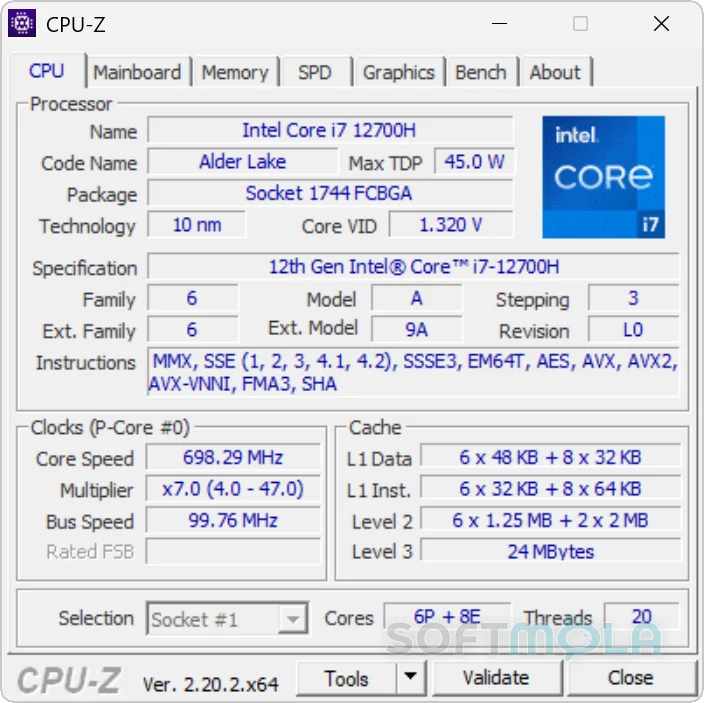
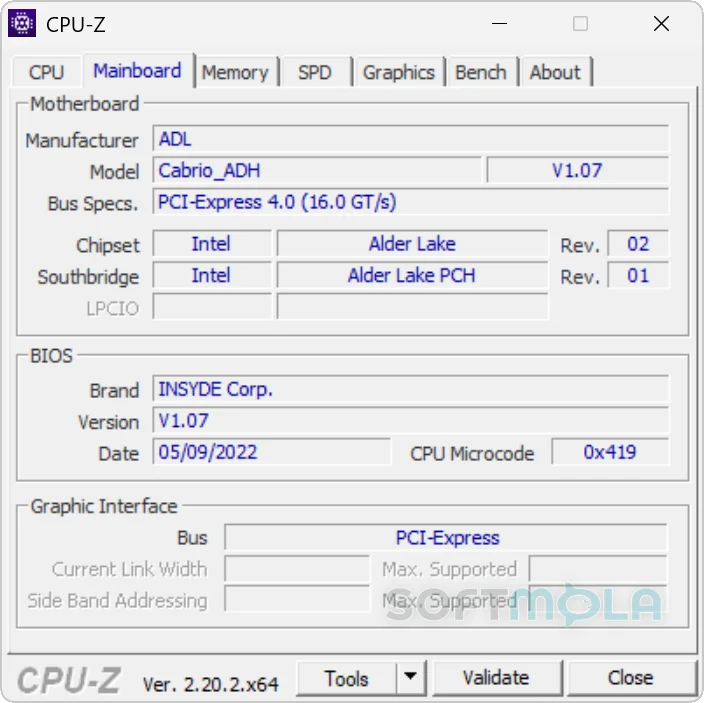
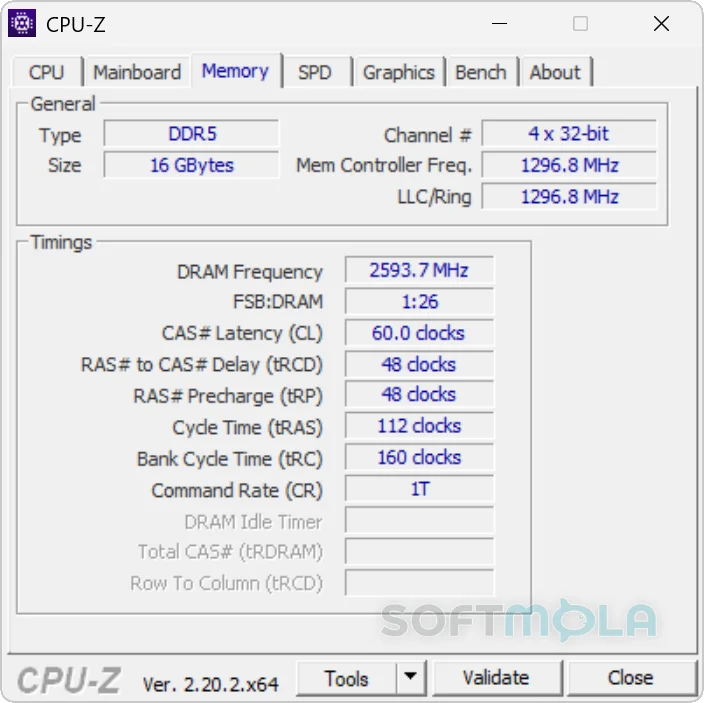
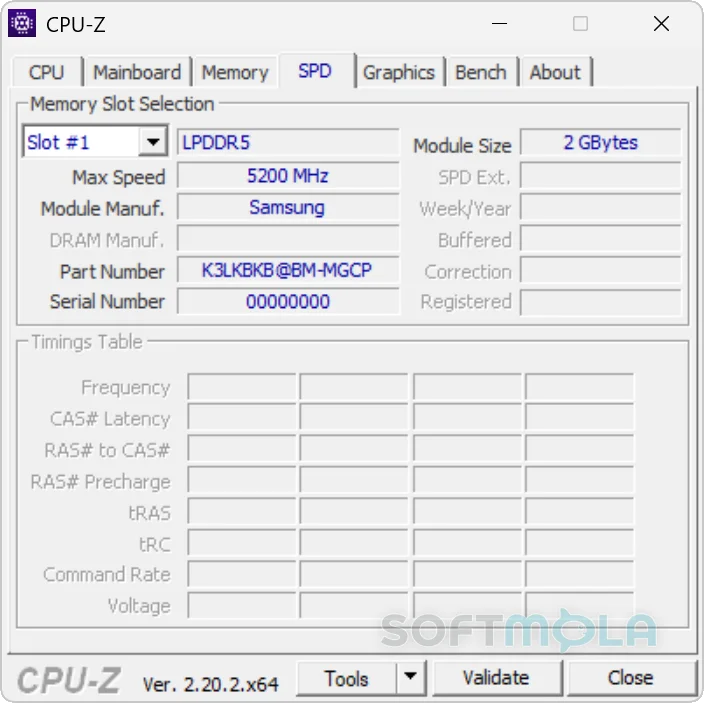
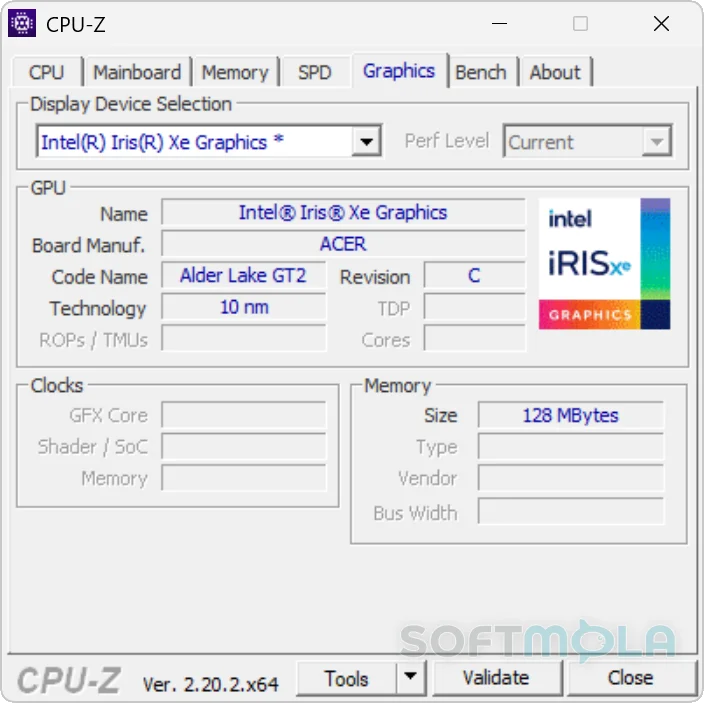
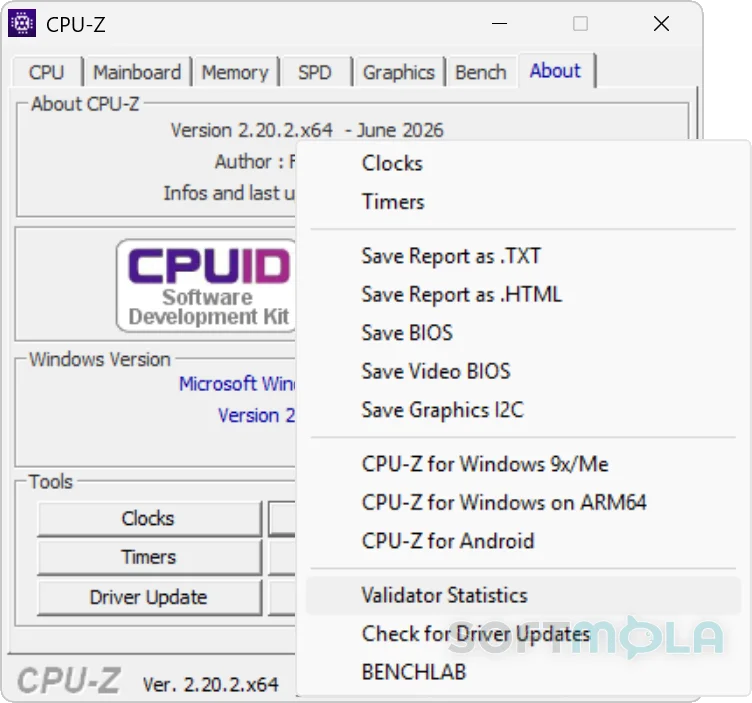
Table of Contents
CPU-Z is a free system information utility for Windows that identifies key hardware inside a PC and presents the details in a compact, technical interface. Developed by CPUID, it focuses primarily on the processor, motherboard, memory, and their operating parameters rather than trying to replace a full hardware-monitoring or diagnostic suite. The current classic Windows release is CPU-Z 2.20.2, published on June 4, 2026.
For PC builders, hardware enthusiasts, troubleshooters, overclockers, and anyone checking an unfamiliar computer, CPU-Z for Windows can answer questions that Windows' basic system pages often cannot. It can identify the exact CPU model and architecture, motherboard chipset, BIOS information, RAM configuration and timings, individual memory modules, and live clock speeds. CPUID officially supports Windows 11, with separate native CPU-Z builds also available for Windows on ARM64 hardware.
Its continuing value comes from specialization. CPU-Z does not attempt to clean a PC, update drivers, scan for malware, or continuously supervise temperatures. Instead, it provides a focused snapshot of hardware identity and configuration, making it particularly useful when verifying a new build, checking an upgrade, investigating memory settings, or confirming whether Windows is seeing hardware as expected.
CPU-Z Review
CPU-Z has remained useful because it solves a relatively narrow problem without turning that problem into a complicated application. Launching the utility exposes detailed hardware information through a series of compact pages rather than dashboards, background services, or account-driven features. For experienced PC users, this approach makes important information quick to reach. Less technical users may need to look up terms such as stepping, CAS latency, chipset, or SPD, but the layout itself is straightforward.
Processor information is the centerpiece. CPU-Z identifies details including the processor name and number, codename, manufacturing process, package, and cache levels. It also measures individual core frequencies in real time. These readings can help confirm whether a processor has been detected correctly and provide useful context when examining boost behavior or an overclock.
The motherboard and memory pages add much of the utility's practical depth. CPU-Z reports motherboard and chipset information and can expose memory type, installed capacity, timings, and SPD data from compatible memory modules. SPD, or Serial Presence Detect, is information stored on a RAM module that describes its specifications. Seeing both the active memory configuration and module-level information can be especially useful after a RAM upgrade or when diagnosing mismatched modules.
Hardware recognition also remains actively maintained. CPU-Z 2.20.2 added or expanded support for recent AMD Ryzen, Intel Core and Core Ultra processors, Intel Arc graphics, and newer HUDIMM and HSODIMM memory modules. That matters for a hardware identification tool: an old detection database can produce incomplete or generic information when installed on a new PC. The June 2026 release indicates that CPU-Z is still being updated for contemporary desktop and mobile hardware rather than merely maintained as a legacy utility.
Windows on Arm users are not excluded. CPUID provides a separate native ARM64 edition, which reports the SoC architecture, core topology, clock information, GPU details, cache topology, system and BIOS information, memory, and Windows build information. The ARM64 branch was at version 1.05 in 2026 and included support for newer Qualcomm Snapdragon X2 Elite hardware alongside other Arm platforms.
CPU-Z also includes benchmarking and validation functions, extending its usefulness beyond passive hardware identification. Its benchmark ecosystem provides single-thread and multi-thread CPU comparisons, while the CPU-Z Validator can publish a system configuration to CPUID's database and generate a shareable validation result. This is particularly relevant to enthusiasts who need evidence of a particular configuration or overclock.
Those features should still be viewed in context. CPU-Z's benchmark is convenient for quick processor comparisons, but it is not a substitute for a broad benchmark suite covering sustained productivity workloads, games, storage, graphics, thermals, and power consumption. Likewise, seeing a changing clock frequency does not turn CPU-Z into a complete sensor-monitoring application. CPUID offers HWMonitor separately for areas such as temperatures, voltages, and fan speeds.
The interface is another trade-off. Its dense boxes, abbreviations, and hardware terminology prioritize information over visual polish. Someone who simply wants a friendly overview of their PC may find Windows' built-in settings or a more graphical system-information application easier to understand. CPU-Z becomes more valuable when the exact details matter.
From a security perspective, the important distinction is that CPU-Z is an information utility, not security software. It does not provide malware detection, ransomware protection, a firewall, or browsing protection. Its relevance to modern PC security is indirect: accurate hardware and BIOS identification can help when checking firmware versions, researching compatibility, or documenting a system, but users still need appropriate Windows security tools for actual threat protection.
CPU-Z therefore fits best as a small specialist utility rather than an application that needs to stay open all day. Its combination of detailed identification, current hardware support, live CPU and memory information, and enthusiast-oriented validation remains useful on current Windows systems.
Key Features of CPU-Z
Detailed Processor Identification
CPU-Z provides significantly more processor detail than the basic model name shown in Windows. It can report the CPU name and number, codename, package, manufacturing process, cache hierarchy, and related architectural information.
This makes the utility useful when identifying exactly which processor variant is installed, confirming hardware after buying or upgrading a PC, or gathering technical information before researching compatibility. Recent CPU-Z releases continue to expand recognition for new Intel and AMD processors, which is particularly important as product families gain more closely related models.
Real-Time CPU and Memory Frequencies
CPU-Z displays live measurements of individual CPU core frequencies as well as memory frequency. Rather than showing only the processor's advertised specification, it lets users observe the operating clock being reported while the system is running.
That can provide a quick indication of how frequencies change under different conditions. Users investigating overclocking settings or memory configuration may find these readings especially useful, although deeper temperature and stability testing requires additional tools.
Motherboard, Chipset, and BIOS Information
Identifying a motherboard is not always straightforward, particularly with prebuilt desktops and laptops. CPU-Z can report motherboard vendor and revision information along with chipset and BIOS details gathered from the system.
These details can help when searching for firmware, documentation, compatible upgrades, or troubleshooting information. They are also useful when Windows reports only a generic system model and a more precise hardware identity is needed.
Memory and SPD Details
CPU-Z reports installed memory type, size, active timings, and SPD information for supported modules.
The distinction is valuable. Active memory information shows how the RAM is currently configured, while SPD data provides specifications stored on individual modules. That makes CPU-Z practical for checking whether memory is running at an expected frequency, identifying installed modules, or investigating a system containing mixed RAM.
CPU Benchmarking
CPU-Z includes benchmarking functionality for comparing processor performance. CPUID also maintains benchmark results that separate single-thread and multi-thread performance and allow comparisons across processor models.
The feature is best treated as a convenient reference rather than a complete performance evaluation. It is useful for a fast CPU-focused comparison or checking the broad effect of a configuration change, while more demanding performance analysis should use several representative workloads.
CPU-Z Validation
The CPU-Z Validator allows users to submit a detected system configuration to CPUID and receive a shareable result containing system specifications and validation status. CPUID also uses the validation platform for enthusiast and overclocking records.
For everyday users this feature is optional, but it can be helpful when documenting a PC configuration or sharing technical information during troubleshooting. For overclockers, validation is one of CPU-Z's more distinctive capabilities.
Report and Configuration Tools
Beyond its graphical interface, CPU-Z can generate hardware reports in text or HTML form through command-line parameters. CPUID documents options that allow the program to collect information and automatically create a report without displaying its normal interface.
This gives advanced users and support technicians a more efficient way to capture system information for documentation or troubleshooting. It also illustrates why CPU-Z remains useful despite its modest interface: much of its value lies in the depth and accessibility of the hardware data rather than presentation.
CPU-Z remains a sensible Windows utility for anyone who regularly needs accurate hardware identification without the overhead of a larger system-management package. Its strongest audience is PC builders, enthusiasts, technicians, upgrade-minded users, and people troubleshooting processor or memory configurations. The interface assumes some familiarity with PC terminology, and users seeking temperature monitoring, security protection, or comprehensive system diagnostics will need other software. For its intended role, however, CPU-Z continues to provide a focused, actively maintained way to understand what hardware a Windows PC contains and how several of its core components are configured.
How to Download and Install CPU-Z on Windows
CPU-Z is available directly from CPUID in both a setup package and a ZIP package for standard x86/x64 Windows computers. The setup version performs a conventional installation, while the ZIP option can be extracted and run without installing CPU-Z in the usual way. Windows on ARM users should use CPUID's separate ARM64 edition.
How to Download CPU-Z
Select the Download for Windows button on this page.
Continue to the verified CPU-Z download source.
Choose the standard setup package if you want CPU-Z installed as a Windows application, or choose the ZIP package if you prefer the stand-alone version.
If your computer uses Windows on ARM, select the dedicated ARM64 edition instead of the conventional x86/x64 release.
Save the selected file to a folder where you can easily find it.
Allow the download to complete before opening or extracting the file.
CPUID publishes separate x86/x64 setup and ZIP options. Its installer automatically selects the correct x86 or x64 application binary for a conventional Windows system, so users choosing the setup package do not need to install those two binaries manually.
How to Install CPU-Z
Open the CPU-Z setup executable you downloaded from the verified source.
If Windows displays a User Account Control confirmation for the installer, review the publisher information before allowing it to continue.
Proceed through the CPU-Z setup and review the installation choices presented by the installer.
Complete the installation.
Open CPU-Z from its installed shortcut or program entry.
CPUID notes that the setup edition creates Start menu and desktop entries and installs the correct x86 or x64 binary for the computer. A restart is not stated as a normal requirement in CPUID's current installation guidance, so one should not be assumed unless Windows or the installer specifically requests it.
How to Run the CPU-Z ZIP Version
Download the official CPU-Z ZIP package instead of the setup edition.
Save the archive in a suitable folder.
Extract the contents of the ZIP archive.
Open the extracted CPU-Z executable appropriate for your Windows system.
Keep the extracted files together if you plan to use CPU-Z again rather than treating them as temporary installation files.
The ZIP edition is useful for users who do not want CPU-Z added as a traditionally installed Windows program. If you prefer Start menu and desktop entries and automatic selection of the correct x86/x64 binary, the setup package is the more convenient option.
CPU-Z Pros & Cons
- Detailed hardware identification: CPU-Z provides processor, motherboard, chipset, memory, and SPD information that goes well beyond the basic specifications shown in Windows.
- Free to use: CPUID distributes the standard Windows x86/x64 edition of CPU-Z as freeware.
- Useful real - time readings: The utility can display individual CPU core frequencies and memory frequency while the system is running.
- Installer and portable - style ZIP options: Users can choose the standard setup package or download the ZIP version when they prefer to run CPU-Z without a conventional installation.
- Current hardware support: CPU-Z continues to receive updates for newer processors, graphics hardware, and memory technologies.
- Native Windows on ARM option: CPUID provides a separate ARM64 build that is fully supported on Windows 11 for ARM64.
- Technical interface: CPU-Z presents many hardware terms, abbreviations, timings, and identifiers without extensive beginner-oriented explanations.
- Not a complete monitoring suite: It can report frequencies and hardware information, but users needing detailed temperature, voltage, or fan monitoring will require another utility.
- Limited scope: CPU-Z does not provide malware protection, driver management, PC cleanup, or comprehensive hardware diagnostics.
- Benchmark results have a narrow purpose: Its built-in CPU benchmark is useful for quick comparisons but does not replace broader testing across games, applications, thermals, graphics, and storage.
Frequently Asked Questions
What is CPU-Z?
CPU-Z is a Windows system information utility developed by CPUID. It identifies important hardware components and reports technical information about the processor, motherboard, chipset, memory, and RAM modules. It can also display real-time CPU core and memory frequencies. The program is primarily intended for hardware identification, configuration checks, troubleshooting, and enthusiast use.
Is CPU-Z free?
Yes. CPUID describes the standard CPU-Z edition for Windows x86/x64 as freeware, so users can download and use it without purchasing a license for the utility itself. CPUID also offers customized branded editions, but the classic CPU-Z version remains available as a free system information tool.
Does CPU-Z work on Windows 11?
Yes. CPUID states that the standard x86/x64 version of CPU-Z is fully supported on Windows 11. A separate native ARM64 edition is also available and is fully supported on Windows 11 for ARM64 devices. Users should choose the edition appropriate for their processor architecture.
Is CPU-Z available for Windows on ARM?
Yes. CPUID provides a dedicated CPU-Z for Windows ARM64 edition. It can report information such as SoC architecture, CPU core topology, GPU details, cache structure, motherboard and BIOS data, memory information, and the installed Windows version. It is separate from the conventional x86/x64 CPU-Z download.
Does CPU-Z need to be installed?
Not necessarily. CPUID provides both a setup version and a ZIP version for conventional Windows x86/x64 systems. The installer creates program entries and automatically installs the appropriate x86 or x64 binary for the system, while the ZIP package can be extracted and run without going through the standard installation process.
Does CPU-Z monitor CPU temperatures?
CPU-Z is not designed as a full temperature-monitoring utility. Its focus is hardware identification and information such as processor and memory frequencies. Users who specifically need temperatures, voltages, power readings, and fan information should use software designed for hardware sensor monitoring rather than treating CPU-Z as a complete monitoring suite.